
 Why choose Breeze
 Marketing
 Creative
 Sales
Sales Remote work
 Managers
 Product teams
 Project management
 Task management
 Kanban tool
 Time tracking
 Project reporting
 Project calendars
 Project timeline
 Team workload
 Project automation
 Project customization
 Chat
Chat Web forms
 Project roadmap
 AI
AI What's new
 Articles & guides
 Help center
 Mobile apps
 Integrations
 Developers & API
 Free tools
Basecamp vs Trello

Disclosure: Breeze publishes this comparison and is one of the tools discussed here. We try to be candid about where Breeze isn't the right fit; weigh that bias when reading our recommendations.
Review process: We compared current vendor documentation, pricing pages, published product interfaces, and independent user reviews. Pricing and plan names were checked against vendor sites on July 16, 2026; vendors change packaging often, so confirm the current total for your team before buying.
When it comes to projects and teams, Basecamp and Trello do things differently. Trello is all about simplicity, using Kanban boards to visually manage tasks. It's great for teams that want to track progress quickly and keep workflows tidy. Basecamp is a central hub that combines task management, communication and file sharing into one place. So it's good for teams that want to collaborate and have project wide transparency.
In this article we'll go into the pros and cons of Basecamp and Trello. By understanding how each tool fits different workflows you'll have a better idea of which one is right for your team. We'll also consider Breeze, an alternative for teams that want a project management tool without the complexity. Breeze is simple with the essentials, perfect for teams of all sizes.
Basecamp vs Trello at a glance
| Feature | Basecamp | Trello |
|---|---|---|
| Best for | Teams that want simple collaboration and team communication | Teams that want simple Kanban-based planning |
| Pricing | Flat-rate plans: $25, $59, $99 or $299 per month, billed annually. Freelancer allows 20 users; Studio and above include unlimited users | Free, with paid plans from $5 per user per month (Standard, annual) and Premium at $10 |
| Rating | 4.3/5 on Capterra | 4.5/5 on Capterra |
| Standout strengths | Basecamp has task tracking, team messaging and file sharing in one place so you don't need multiple tools like you do with Trello's integrations; Built in communication tools like message boards and real-time chat keep discussions centralised, not like Trello's comment based system | Trello is task management focused with simple Kanban boards, Basecamp's extra features can feel overwhelming for smaller projects; Pre-built boards and templates make it faster and easier to get started with Trello than Basecamp's full platform |
| Main tradeoff | Light on visual boards, custom workflows, and reporting depth | Kanban-only; thin on messaging, docs, and cross-project structure |
Quick verdict: Basecamp vs Trello
Choose Basecamp if:
- Basecamp has task tracking, team messaging and file sharing in one place so you don't need multiple tools like you do with Trello's integrations
- Built in communication tools like message boards and real-time chat keep discussions centralised, not like Trello's comment based system
- Clear project dashboards give you visibility into tasks, deadlines and team progress, more than Trello's Kanban only structure
Choose Trello if:
- Trello is task management focused with simple Kanban boards, Basecamp's extra features can feel overwhelming for smaller projects
- Pre-built boards and templates make it faster and easier to get started with Trello than Basecamp's full platform
- Card based system keeps task tracking visual and collaborative without the layers of tools and menus in Basecamp
Choose Breeze if:
- Breeze can be adopted quickly and teams can manage projects without complicated setup
- Time tracking is a core feature of Breeze, helping teams monitor productivity directly within the platform. In contrast, Trello relies on third-party integrations, and Basecamp doesn't offer built-in time tracking
- Breeze combines essential project management features, like workflow automation and real-time collaboration, into one streamlined platform. Trello's focus on Kanban boards can feel limited for complex workflows, while Basecamp excels in communication but lacks robust task-tracking tools
Key differences between Basecamp and Trello
Basecamp is a better fit for teams that want simple collaboration and team communication. Trello is a better fit for teams that want simple Kanban-based planning.
The main difference comes down to how much structure, setup, and reporting your team needs. Both are easy to pick up: Basecamp has a low learning curve, and Trello is even simpler, since most people understand a single board within minutes.
Is Basecamp better than Trello?
Basecamp is better than Trello for teams that want simple collaboration and team communication.
Trello is better than Basecamp for teams that want simple Kanban-based planning.
Breeze is a good alternative if you want boards, timelines, time tracking, and automation in one simpler workspace.
Teams that rule both out usually shortlist a few Basecamp alternatives or weigh alternatives to Trello side by side.
If Trello is the side you are leaning towards but you expect the work to get more technical, Jira vs Trello covers what changes once a board has to carry sprints, backlogs and workflow rules.
What is Basecamp?

- Pricing: Flat-rate plans: $25, $59, $99 or $299 per month, billed annually. Freelancer allows 20 users; Studio and above include unlimited users
- Rating: 4.3/5 on Capterra
Basecamp takes a broader approach to team collaboration with tools for communication, task management and file sharing in one place. Trello goes for simplicity with its Kanban boards and is great for teams working on smaller projects or need to get organized quickly.
If you're working on multiple projects or want streamlined team communication Basecamp is a more full featured alternative to Trello's minimalism. Trello's visual boards are simple and easy to use but Basecamp is for teams that need more than just task tracking.
What users say about Basecamp
"The experience with Basecamp has been super productive."
Source: Capterra
What is Trello?

- Pricing: Free, with paid plans from $5 per user per month (Standard, annual) and Premium at $10
- Rating: 4.5/5 on Capterra
Trello's visual-first design makes task management simple, teams can organize work through Kanban boards. Each task is a card that can be moved across columns, easy to see progress at a glance. Basecamp has a broader toolset, combining project management with team messaging, file sharing and to-do lists. So Basecamp is perfect for teams that need a central hub for collaboration and task management.
Minimal setup means teams can get into projects quickly with no need for extensive tutorials or configuration. Basecamp is comprehensive but often requires teams to learn the various tools which can take more time. For smaller teams or new to project management Trello's approach is an easy and efficient way to get productive, Basecamp is for teams managing multiple workflows.
What users say about Trello
"I love using Trello to organise ideas, and this is so easy to do."
Source: Capterra
Basecamp vs Trello features
Basecamp and Trello overlap on core project management, but they emphasize different strengths. The main differences usually come down to workflow depth, visibility, setup effort, and how much structure the team needs day to day.
| Area | Basecamp | Trello |
|---|---|---|
| Workflow style | Teams that want simple collaboration and team communication | Teams that want simple Kanban-based planning |
| Top strengths | Basecamp has task tracking, team messaging and file sharing in one place so you don't need multiple tools like you do with Trello's integrations; Built in communication tools like message boards and real-time chat keep discussions centralised, not like Trello's comment based system | Trello is task management focused with simple Kanban boards, Basecamp's extra features can feel overwhelming for smaller projects; Pre-built boards and templates make it faster and easier to get started with Trello than Basecamp's full platform |
| Ease of use | Low learning curve | Very low, minimal learning curve |
| Main tradeoff | Light on visual boards, custom workflows, and reporting depth | Kanban-only; thin on messaging, docs, and cross-project structure |
Basecamp stands out for keeping task tracking, team messaging, and file sharing in one place, so you avoid the integration sprawl Trello often needs, with built-in message boards and real-time chat that centralize discussion rather than scattering it across card comments.
Trello stands out for a focused, visual Kanban approach that feels lighter than Basecamp for smaller projects, with pre-built boards and templates that make it quick to get started.
Basecamp vs Trello pricing
Pricing changes over time, so confirm the latest details on each vendor site before you commit.
| Plan detail | Basecamp | Trello |
|---|---|---|
| Pricing | Flat-rate plans: $25, $59, $99 or $299 per month, billed annually. Freelancer allows 20 users; Studio and above include unlimited users | Free, with paid plans from $5 per user per month (Standard, annual) and Premium at $10 |
| Rating | 4.3/5 on Capterra | 4.5/5 on Capterra |
Basecamp charges a flat rate: $25 (Freelancer), $59 (Studio), $99 (Pro) or $299 (Unlimited) per month, billed annually. Freelancer allows 20 users; Studio and above include unlimited users.
Trello pricing: Free, with paid plans from $5 per user per month (Standard, annual) and Premium at $10.
The better value depends on team size, feature needs, and how much workflow depth or reporting your team actually needs.
Basecamp vs Trello ease of use
Basecamp usually has a low learning curve; its tools are simple, though there are several of them to get familiar with.
Trello has an even lower, more minimal learning curve — the single-board, drag-and-drop model is understood almost immediately.
If your team values fast adoption and lower overhead, choose the simpler option. If you need more control, customization, or reporting, a steeper learning curve can still be worth it.
Basecamp pros and cons
Basecamp pros
- Basecamp has task tracking, team messaging and file sharing in one place so you don't need multiple tools like you do with Trello's integrations
- Built in communication tools like message boards and real-time chat keep discussions centralised, not like Trello's comment based system
- Clear project dashboards give you visibility into tasks, deadlines and team progress, more than Trello's Kanban only structure
- Everything you need is included without needing add-ons like Trello's Power-Ups which often require extra cost or setup
- Basecamp's flat rate covers all users and features so it's more straightforward than Trello's tiered plans
- Teams can store and manage files inside Basecamp so you don't get the attachment sprawl that comes with Trello boards
Basecamp cons
- No Kanban board view or drag-and-drop task pipeline like Trello's
- Light on custom workflows, automation, and analytical reporting
- Flat $299 or $15-per-user pricing is costly for very small teams and freelancers
- No built-in time tracking without third-party tools
Trello pros and cons
Trello pros
- Trello is task management focused with simple Kanban boards, Basecamp's extra features can feel overwhelming for smaller projects
- Pre-built boards and templates make it faster and easier to get started with Trello than Basecamp's full platform
- Card based system keeps task tracking visual and collaborative without the layers of tools and menus in Basecamp
- Power-Ups integrate Trello with Google Drive, Slack and Jira so it's more adaptable for different workflows
- Drag and drop interface means less learning curve for teams new to project management tools
- Free plan means Trello is more accessible to smaller teams, Basecamp's flat pricing doesn't scale as well for startups or freelancers
Trello cons
- Kanban-only structure strains on larger or multi-stage projects
- Relies on paid Power-Ups and integrations for features beyond boards
- No built-in messaging, docs, or file hub like Basecamp
- Reporting and cross-project visibility are thin without add-ons
When Basecamp is the better choice
- Basecamp has task tracking, team messaging and file sharing in one place so you don't need multiple tools like you do with Trello's integrations
- Built in communication tools like message boards and real-time chat keep discussions centralised, not like Trello's comment based system
- Clear project dashboards give you visibility into tasks, deadlines and team progress, more than Trello's Kanban only structure
When Trello is the better choice
- Trello is task management focused with simple Kanban boards, Basecamp's extra features can feel overwhelming for smaller projects
- Pre-built boards and templates make it faster and easier to get started with Trello than Basecamp's full platform
- Card based system keeps task tracking visual and collaborative without the layers of tools and menus in Basecamp
Breeze as an alternative
Basecamp and Trello are great project management tools, but Breeze is the best for teams that want simplicity. With features to organize tasks, track time and manage workflow Breeze keeps things efficient without overwhelming users with options. It's a great choice for teams looking for a practical and easy to use solution.
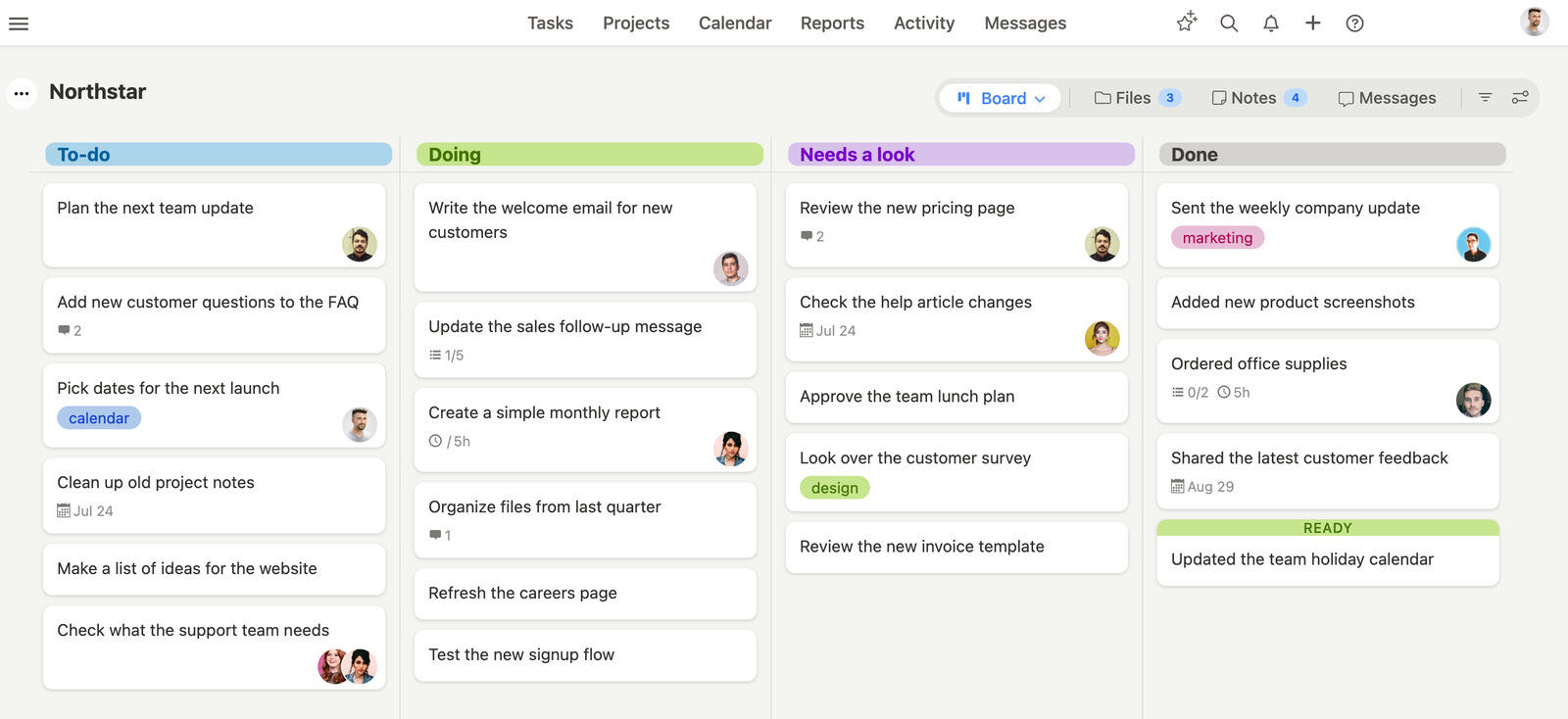
Breeze combines simplicity with functionality in a way that sets it apart from the competition. Basecamp is good for team communication but lacks advanced task tracking so some teams are looking for more. Trello's Kanban boards are good for task organization but rely too much on Power-Ups for extra features which can complicate workflows. Breeze avoids those pitfalls by being an all in one solution.
The tool is easy to adopt and get started with. Breeze lets you manage tasks, visualize timelines and collaborate in one place. In contrast to Basecamp's communication heavy structure or Trello's feature extensions Breeze is a well rounded tool that meets most team's needs without overwhelming them. No long onboarding and teams can get started right away.
Both gaps are worth seeing in detail — Basecamp and Breeze side-by-side on the task tracking Basecamp leaves out, and our Trello comparison on what the Power-Up model costs once you add those features back.
What users say about Breeze
"I love that I can see everything in one place (the dash board) also that I can easily prioritize the tasks I need to complete."
Source: G2
Which tool should you choose?
Choose Basecamp if:
- Basecamp has task tracking, team messaging and file sharing in one place so you don't need multiple tools like you do with Trello's integrations
- Built in communication tools like message boards and real-time chat keep discussions centralised, not like Trello's comment based system
- Clear project dashboards give you visibility into tasks, deadlines and team progress, more than Trello's Kanban only structure
Choose Trello if:
- Trello is task management focused with simple Kanban boards, Basecamp's extra features can feel overwhelming for smaller projects
- Pre-built boards and templates make it faster and easier to get started with Trello than Basecamp's full platform
- Card based system keeps task tracking visual and collaborative without the layers of tools and menus in Basecamp
Choose Breeze if:
- Breeze can be adopted quickly and teams can manage projects without complicated setup
- Time tracking is a core feature of Breeze, helping teams monitor productivity directly within the platform. In contrast, Trello relies on third-party integrations, and Basecamp doesn't offer built-in time tracking
- Breeze combines essential project management features, like workflow automation and real-time collaboration, into one streamlined platform. Trello's focus on Kanban boards can feel limited for complex workflows, while Basecamp excels in communication but lacks robust task-tracking tools
These two aren't really rivals so much as answers to different questions: Trello is a way to visualize a workflow, and Basecamp is a way to run a whole team's communication. If your pain is "where does this task live and what stage is it in," Trello wins and stays free for a long time. If your pain is "our updates, files, and decisions are scattered across email and chat," Basecamp is the better buy despite costing far more. The trap is choosing on price alone: Trello looks cheaper, but if you end up bolting on Power-Ups for reporting, docs, and time tracking, you've quietly rebuilt a heavier tool anyway, at which point a middle-ground option like Breeze is worth a serious look.
Choosing a project management tool is about understanding your team's quirks and how you work together. Trello is great for teams who like quick task organization without extra layers. Basecamp is an all-in-one collaboration tool, where everything is in one place - communication, files and tasks.
If your team values ease of use and the essentials, Breeze is worth a look. It combines time tracking, workflow automation and Kanban tools into a platform that eliminates the noise, so you can focus on what matters. With Breeze, being organized becomes second nature, no matter the size or scope of your projects. Get your team involved, try these out and find the one that works for you and makes work feel more efficient. Breeze may just surprise you.
FAQ
- Is Basecamp better than Trello?
- Basecamp is better than Trello for teams that want simple collaboration and team communication. Trello is better than Basecamp for teams that want simple Kanban-based planning.
- Which tool is easier to use, Basecamp or Trello?
- Both are easy to learn. Basecamp has a low learning curve, and Trello is even simpler, since its single-board, drag-and-drop model is understood almost immediately.
- How do Basecamp and Trello compare on pricing?
- Basecamp charges a flat rate: $25 (Freelancer), $59 (Studio), $99 (Pro) or $299 (Unlimited) per month, billed annually. Freelancer allows 20 users; Studio and above include unlimited users. Trello pricing: Free, with paid plans from $5 per user per month (Standard, annual) and Premium at $10.
- What is a good alternative to Basecamp and Trello?
- Breeze is a strong alternative if you want boards, timelines, time tracking, and automation in one simpler workspace.




